
Zingo! Wallet supports the encrypted memo feature, ideal for adding confidential details to your payments or sending private messages to the receiver. This secure tool ensures that your communication is as private as the transaction.
An encrypted memo is a private message attached to a cryptocurrency transaction, which can only be read by the sender and receiver of the transaction. It uses cryptographic techniques to ensure that sensitive information remains protected from prying eyes.
⚠️ No one can read your memo, not even the Zingo! team can access the contents of the memo.
Uses of Encrypted Memos
Communicate confidential information related to payments, invoices, purchase lists and many more.
Keep a private record of transaction notes for future reference.
Discuss sensitive, private topics or send love letters.
Send and Receive an Encrypted Memo.
To send an encrypted memo through the wallet, follow these steps:
From the Send section when you add the shielded address the memo option is enabled for you.
Write your message in the text field. You can check the option to include your UA (Address) if you want to receive a reply.
Confirm the transaction and the memo will be encrypted and sent with the transaction. To view an encrypted memo, simply select the transaction in History, go to Transaction Details and go to the Memo section to read the received message.
Limit of an Encrypted Memo.
The encrypted memo, with an invariable length of 512 bytes, is present in all transactions, regardless of their specification. If unspecified or less than 512 bytes, it is padded with zeros prior to encryption to preserve privacy and prevent the blockchain from revealing usage patterns.
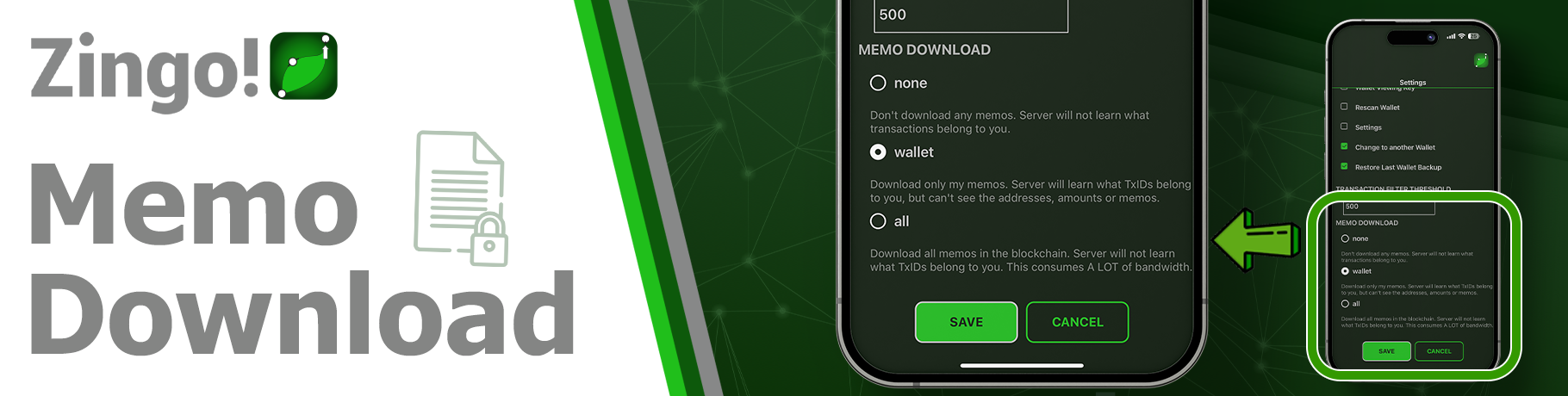
To configure the download of encrypted memos open the application and go to Settings, select the option Memo Download and here you can choose between three settings:
None❌: Memos are neither downloaded nor displayed in the wallet.
Wallet💰: Only memos related to transactions or information from your wallet are downloaded and displayed.
All✔️: All memos are downloaded from the blockchain, but only those related to your wallet are displayed.
💡 Remember that the choice will depend on your privacy and information management needs. For more information, read the description in Settings.
Zingo Wallet encrypted memos are a secure and convenient way to communicate with other users, knowing that your information is protected. If you need to send confidential or private information, encrypted memos are the best choice.
Install Zingo!
Zingo-PC | GitHub | Google Play | App Store

