The world of cryptocurrencies can seem like a sea of opaque data: transactions, hexadecimal numbers and lots of technical jargon. Block explorers are born to bridge the gap between that complexity and anyone who wants to understand what's going on under the hood of a blockchain.
What is a block explorer?
A block explorer is the universal search engine of the blockchain: by typing an address, a transaction hash or the height of a block, it connects directly to the network, collects in real time every relevant data and presents it in clear and navigable panels. That way, from your browser you can review the history of any ZEC, verify payments, query commissions and analyze mining rewards without the need to understand code or deal with raw data.
What is it for?
Verify transactions: confirm that your payment arrived at its destination by viewing details such as date, amount and commissions.
Check blocks: find out how many transactions each block contains, who mined it and what reward it generated.
Monitor addresses: track the receipt and sending of funds in any public wallet.
Scan the mempool: watch pending transactions and estimate competitive commissions.
Analyze network statistics: access data on difficulty, hash rate and total blockchain size, essential for developers and miners.
Meet Zcash Block Explorer
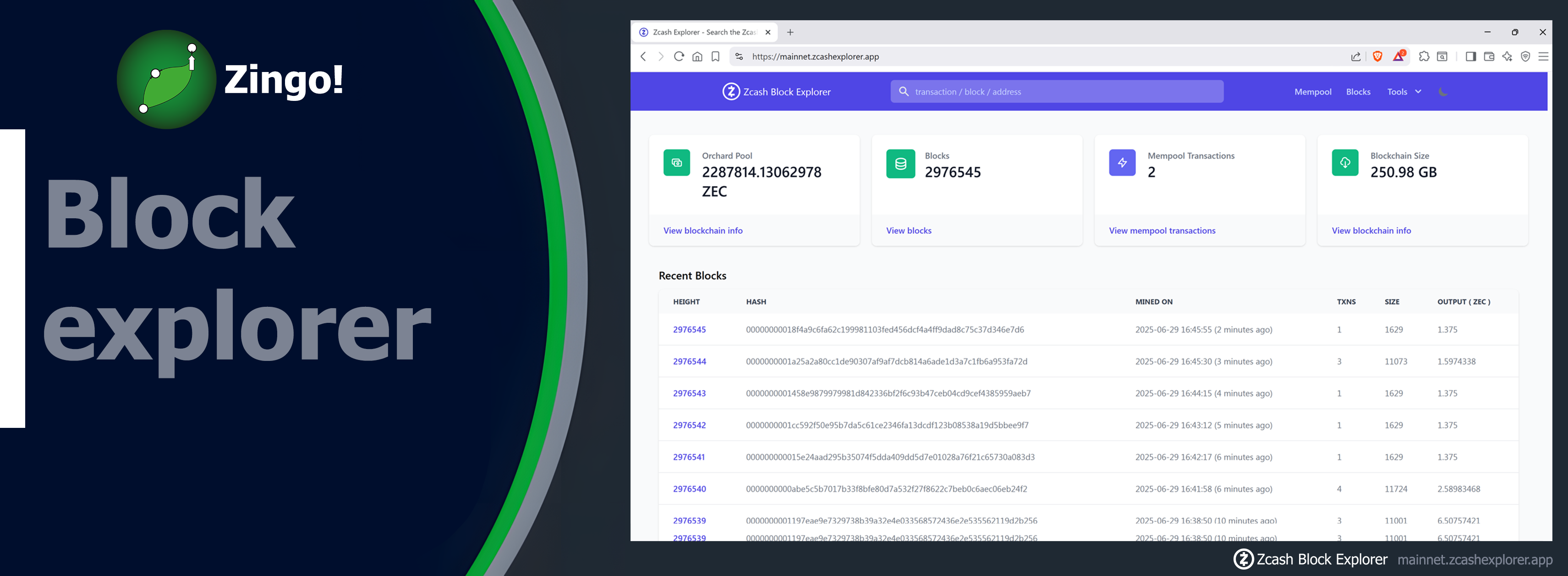
Zcash Block Explorer (mainnet.zcashexplorer.app) condenses all network activity in one place, balancing simplicity and depth.
- 📊Overall panel
Total balance in the Orchard vault: reflects how many ZECs are sheltered in the last privacy layer.
Block height and chain size: shows how many blocks have been mined and the total weight of the blockchain.
Real-time Mempool: lists pending transactions, key to anticipate fees and congestion.
- ⛏️Recent blocks
Height, hash and timestamp: identify each block accurately.
Transaction count and size in bytes: see at a glance how much is moving and how big each block is.
Reward in ZEC: monitor miners' current earnings.
- 🔄Instant transactions
ID + block + date and time: fast tracking of funds flow.
Type (transparent, shielded or exchange): distinguishes between what is visible to the public and what remains encrypted.
Amount visible only in transparent transactions-shielded ones hide addresses and values, reinforcing privacy.
- 🛡️Small big privacy victories
When you select a Shielded transaction you only see confirmations, timing and commission. Not a single address or cent exposed: the splendor of Zcash in action.
Its design does not overwhelm the novice user while making it easy for the more technical user to delve deeper into the data. Simply put, Zcash Block Explorer balances clarity and detail, making it ideal for anyone interested in exploring the Zcash universe.
🔎 This is the explorer we use on Zingo!🍃Wallet and Zingo PC for you to track your transaction. Just click View in Block Browser and it will automatically open the page with all the details.
If you want to take the next step, try searching for your own address or comparing two consecutive blocks. You'll see the blockchain register come to life, while keeping the promise of privacy that makes Zcash unique!
Install Zingo!🍃
🤖Google Play | 🍏App Store | 💻Zingo-PC | ✅GitHub

