
What is it?
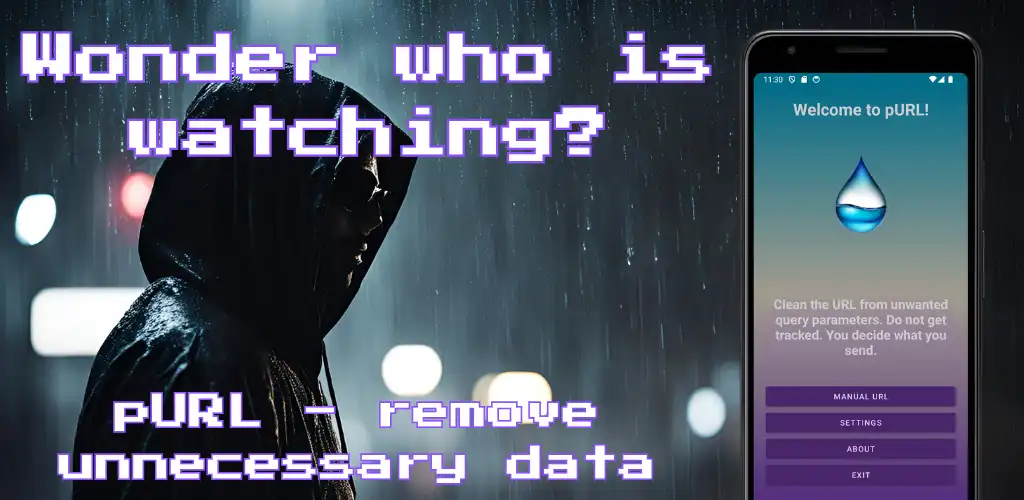
pURL (which should be a fun name standing for pure URL) is an Android app. It tries to give you the option to clear the URL (~ website address) from tracking parameters in case you want to share it with anyone. If you want to share any interesting post from social media, or news article link, you can usually use the share button or just simply copy the address. In most cases, these addresses are polluted with tracking parameters (also called query string) which can provide more info about your behavior and connections between profiles, like you can see on Twitter.
What is URL?
URL - Uniform Resource Locator, is a text string that specifies the location of a resource on the Internet. It is a type of Uniform Resource Identifier (URI) and is used to retrieve resources such as web pages, images, videos, and files. In the context of the pURL application, you can imagine it as a website address.
What is a query string?
URL parameters, also known as query strings or URL query parameters, are elements inserted in a URL to provide additional information and data. They are used to filter and organize content (e.g. sorting), implement tracking, or pass data (e.g. category on the e-shop) from one page to another. Parameters might be sometimes necessary to keep. It can specify the content, which should be shown to you, like the ID of the video on YouTube, or category in the online shop. Not all parameters are evil. With pURL, you can choose which you want to use.
How can I use it?
I tried to make it user-friendly (you can judge by yourself if it was successful or not). There are 3 ways how you can try to clean the URL.
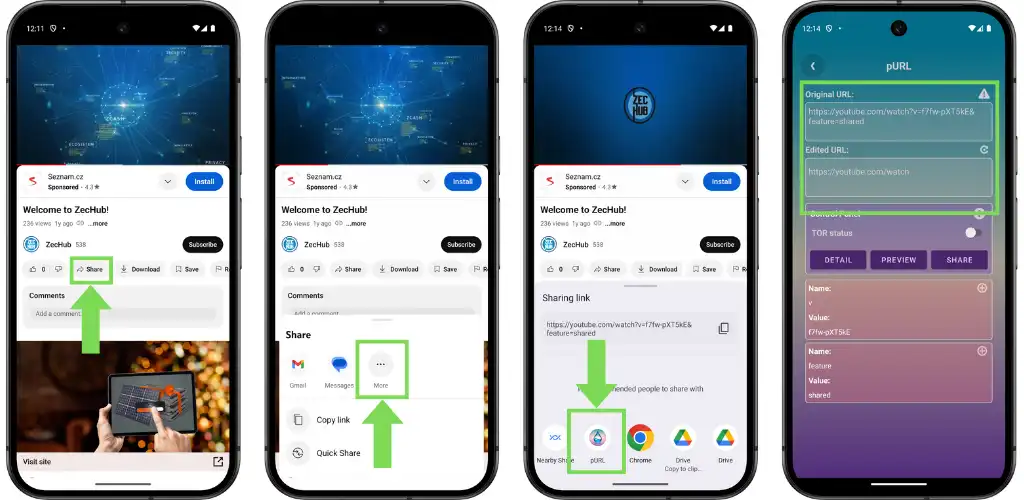
1. Share button
When you click on the 'Share button' on your favorite website, or application, the pop-up with recommended applications occurs. Select the pURL application to open the link for the cleanup.
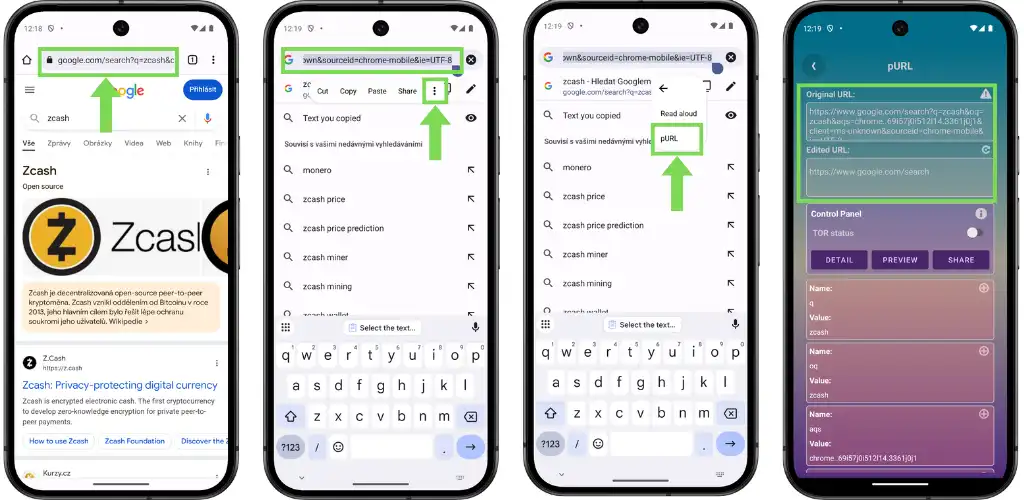
2. Contextual menu
It could be that you want to share the URL address directly from the browser. In that case, select the address which you want to clean up. When the contextual menu pops up, select the pURL option. The selected text will open in the pURL app for adjustment.
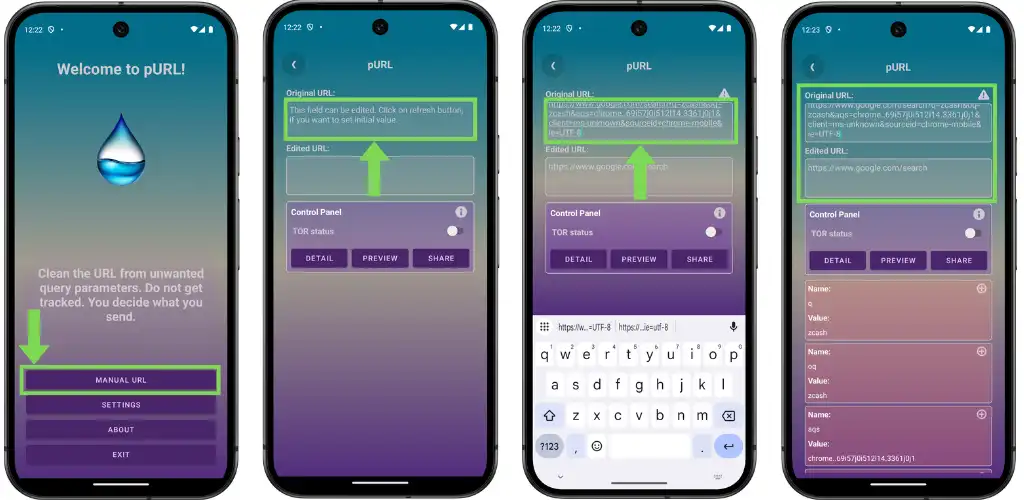
3. Manual insert (copy & paste)
The last option is to open the app and copy & paste the URL into the app manually.
Cleanup of the URL
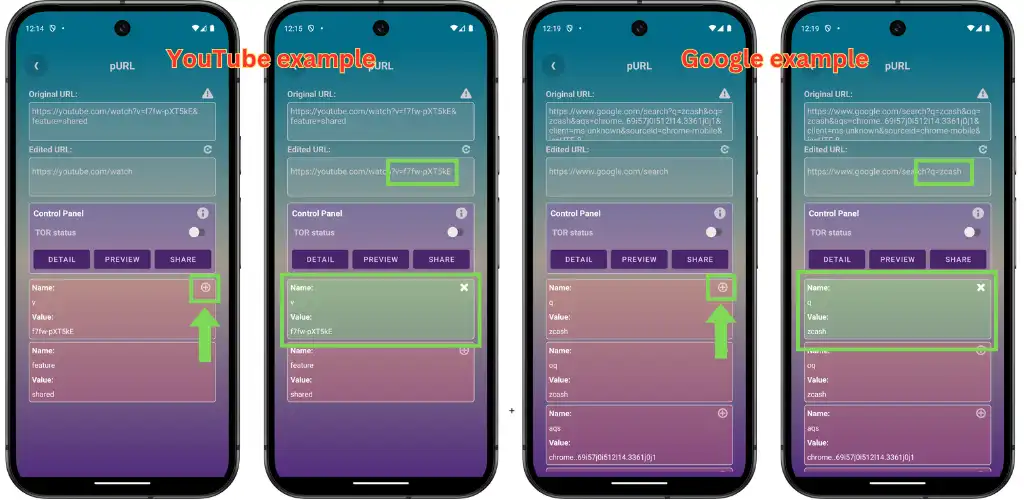
Once the app loads the URL it removes all its parameters. As stated previously, some query parameters might need to stay in the URL to work properly, like in the example of the YouTube video, we have to keep video ID. We can manage this with the Detail button.
Detail button
If you click on the Detail button you should see all removed parameters with their names and values. All removed parameters are highlighted with a red background. We can add that parameter by tapping on the + button. If you add any by mistake (green background), you can remove it again by tapping on the - button. You should see the adapted URL in the field Edited URL.
Preview button
Unfortunately, it requires a bit of experience to understand what is necessary to keep. For that purpose, there is a Preview button to give you a chance to see how the result looks. For enhanced privacy you can try to use a connection through the TOR network, but keep in mind the traffic through the TOR is slow and some websites can even block the traffic from the TOR network. The preview uses a webview component, which should render the result of the final address. The webview has by default enabled JavaScript. If you want to disable it, please, visit the Settings section of the application.
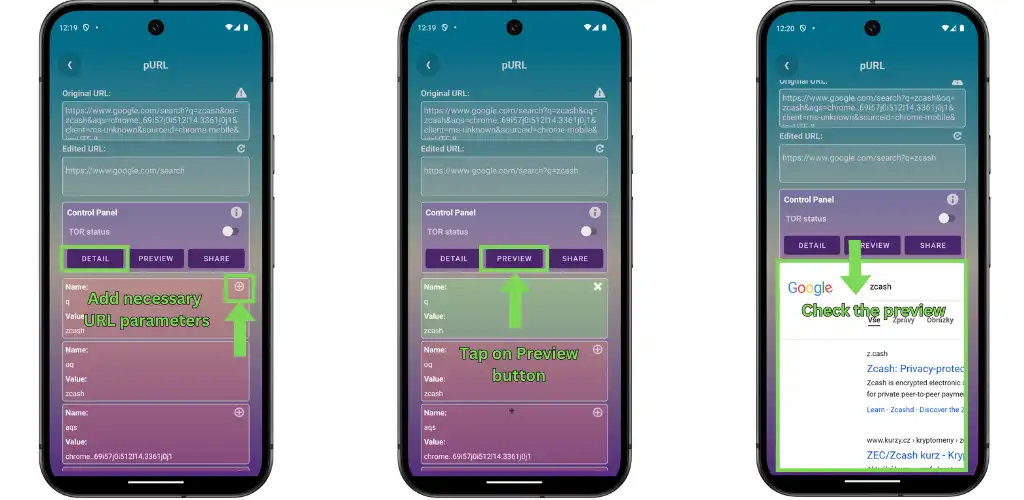
Furthermore, some websites might refuse to display in the webview even when you do not use TOR and have enabled JavaScript, for example, Twitter/X (I wonder what they want to track). I might try to rework the preview button to open the link on ChromeTab (browser component) if it makes sense.
What is TOR
TOR (The Onion Router) is a free and open-source software that enables anonymous internet browsing by routing internet traffic through a network of volunteer-operated nodes, called relays. It was originally developed by the US Naval Research Laboratory in the 1990s and is now maintained by the Tor Project.
What is Javascript
JavaScript is a scripting or programming language that allows you to implement complex features on web pages. JavaScript gives websites functionality and many modern websites cannot work without it and will not load without it at all. On the other hand, JavaScript might be used to smuggle unwanted malware into your device if it is exploited by any threat actor. You can find about Javascript more in here in MDN docs.
Share button
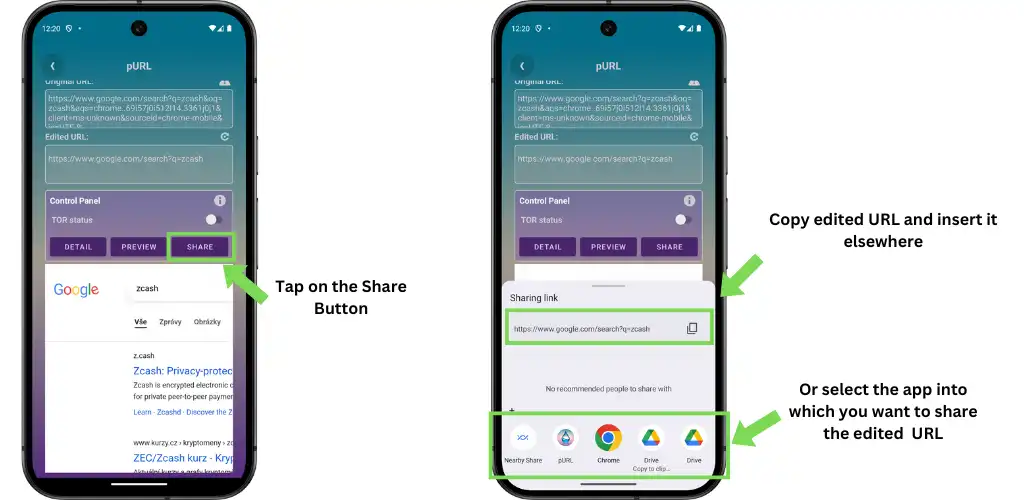
Once everything is ready and you are happy about your adjustment/clean up you can simply tap on the Share button and select to which application you would like to share with. It could be a messenger such as SimpleX, an email client, or anything that is offered to you from the pop-up.
Possible improvements
For now, it is only a dumb query string removal tool. I was thinking about adding a URL check if contains only the Latin alphabet (to detect possible scams, which might be a future extension), or using some public open DB of phishing sites to inform users about possible threats (but I did not find a way how to do it without server till now).
tl;dr
- pURL is an Android App which helps to remove URL parameters
- URL parameters might be used for tracking
- pURL gives the option to load preview (which might have limited functionality)
- pURL can enhance your privacy by using the TOR network for preview
- pURL can enhance security to load preview without Javascript (but can limit functionality and might fail to display the website)
Conclusion
It was a fun project. I thought would be half-day fun, but turned out to be the whole weekend fun. I tried to make my family and friends be my testing guinea pigs to find out if it can work (probably no one else will use it anyway). And it works, sometimes:) It depends on how many are people concerned about the small thing called privacy (yeah, yeah, in that case, we should not be on Twitter in the first place, but where would be the fun).
If you find any bugs or typos (probably quite a few), please, let me know, thanks! Have a great day.