

Let's build a chatbot that knows everything about some corpus and can answer any question about it - a chatbot that can teach us about the Zcash Foundation zebra repo! To do this, we're going to use a technique called Retrieval-Augmented Generation (RAG).
In the context of Retrieval-Augmented Generation (RAG), "corpus" refers to the large dataset or collection of texts that the model accesses or retrieves information from during its generation process. The RAG model architecture combines a retriever model, which searches the corpus for relevant documents or text snippets based on the input query, with a generator model, which uses the information from the retrieved documents to generate an answer or continuation of the text.
This approach allows RAG models to leverage vast amounts of information stored in the corpus to enhance the quality, relevance, and factual accuracy of their outputs. The corpus can be composed of a wide range of texts, such as Wikipedia articles, books, news articles, or any other large text dataset deemed useful for the task at hand. The choice of corpus directly impacts the model's ability to provide informative and accurate answers, as it determines the breadth and depth of knowledge the model can draw upon.
For an example corpus, we're going to use the Zcash Foundation zebra git repository. The goal of the chatbot will be to help people who want to understand the codebase and contribute to it. zebra is a fairly large multi-package repo that has 285 directories, 1218 files.
If you want to skip ahead see the code for the chatbot check here on Github. Be warned that I'm learning and experimenting and just slapping things together for fun. We'll clean up and organize later after we know more. Still, check out some of these results versus vanilla ChatGPT 4!
Just using any random example from the codebase:
What is
hash_or_else?
To GPT4 this hash_or_else could be anything:
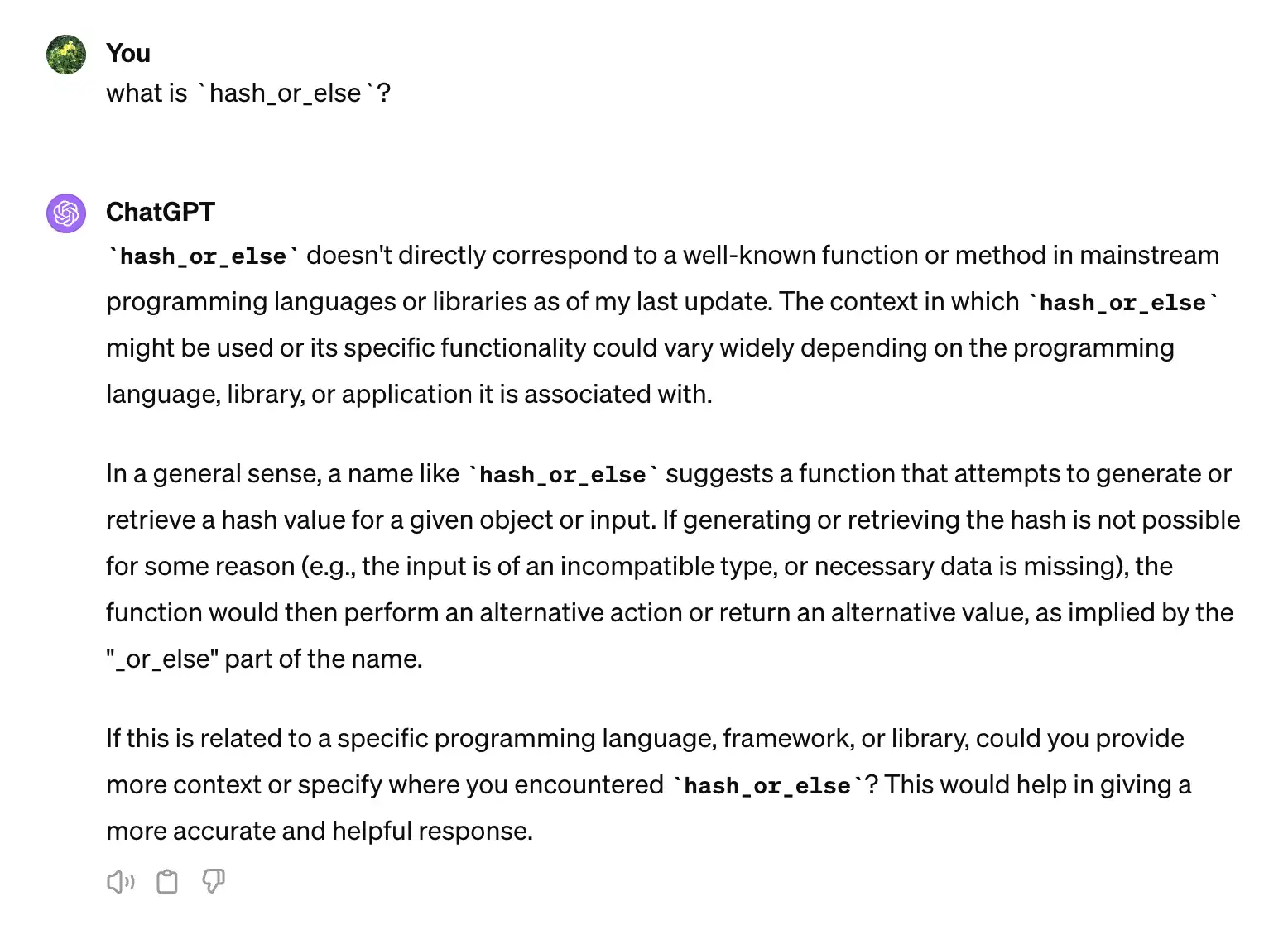
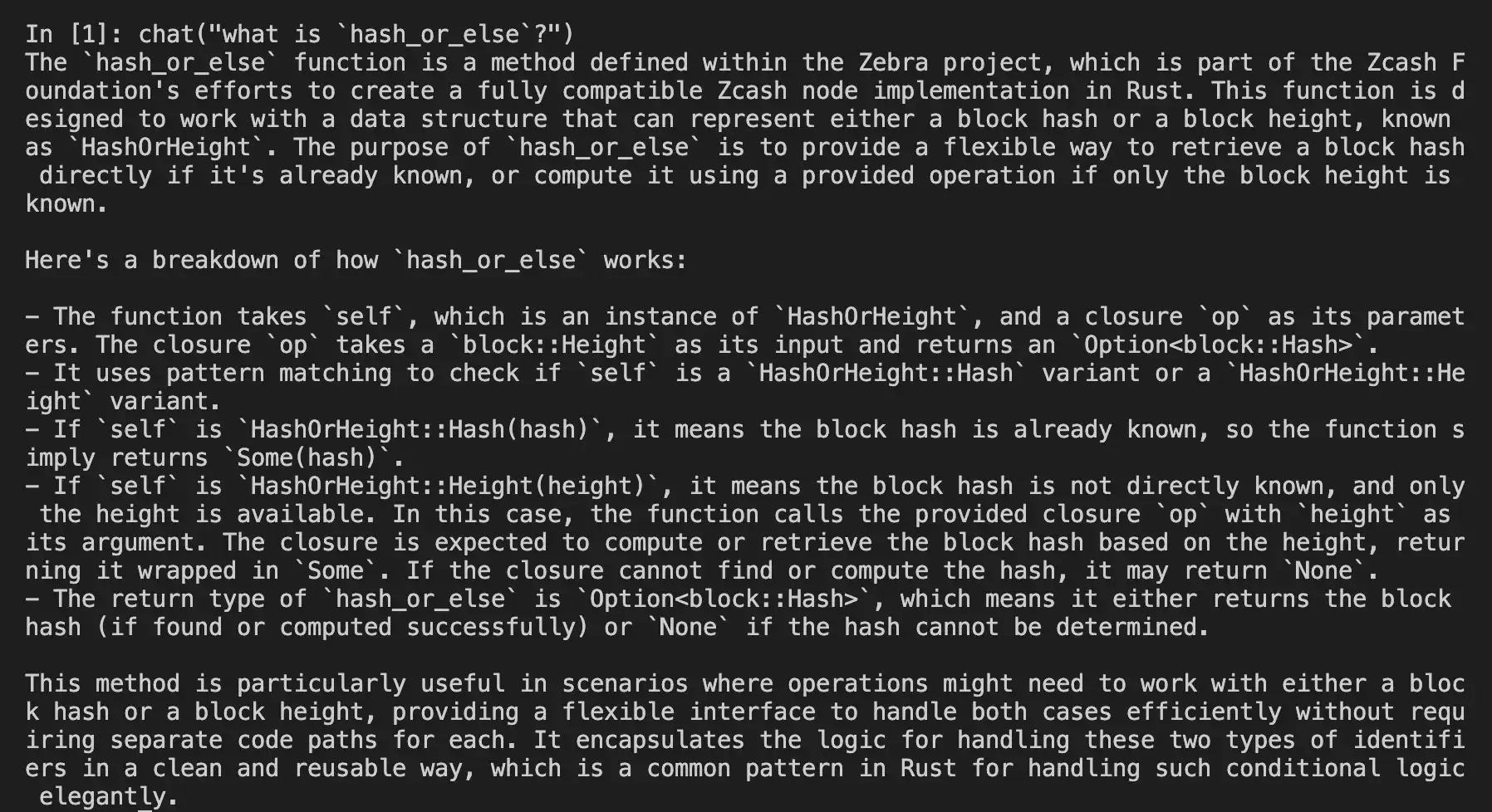
In contrast, the LLM application we're going to build knows all about hash_or_else in the zebra repo we want to learn about (zebra experts please fact-check!):
What is RAG?
Retrieval Augmented Generation (RAG) combines the precision of information retrieval with the generative capabilities of neural networks. It enhances model responses by fetching relevant context from a vast dataset, then weaving this information into coherent, enriched text. RAG operates on the principle that more data, specifically the right data, improves output quality, allowing it to generate answers that are both accurate and contextually deep. This approach leverages the strengths of both retrieval-based and generative AI, offering a sophisticated tool for tasks requiring nuanced understanding and synthesis of information.
Why is RAG important?
RAG represents a paradigm shift in natural language processing. By integrating retrieval into generation, it significantly broadens a model's knowledge base without enlarging its parameters. This method allows models to access the latest information, sidestepping the staleness inherent in solely training-based approaches. It ensures relevance and freshness in responses, crucial for rapidly evolving fields. Furthermore, RAG democratizes access to high-quality information synthesis, enabling smaller models to perform at the level of their more extensive counterparts. It's a bridge between the vastness of available data and the need for precise, context-aware synthesis, making it pivotal for advancing AI's utility and efficiency.
I've been interested in ideas around context injection for some time now. Think: if you are talking to an LLM chatbot, you can juice up the context by pasting in tons of stuff and telling the bot everything relevant when asking it something. But, that would take a long time and you'd have to already know a lot to tell the chatbot about the subject you want information on. I want a dedicated chatbot that has all of the relevant context and can do what I want even if I'm vague and lazy. I want to talk to the chatbot like it is the greatest master of the codebase in question and it already knows everything about it without me having to tell it.
RAG from Scratch
LangChain is a framework for developing applications powered by large language models (LLMs).
LangChain is pretty freaking awesome. I've fiddle-faddled with different RAG hacks and LLM applications for some months now. But, this recent release from the LangChain crew helped things click more for me:
Here is the repo to go with that video playlist: https://github.com/langchain-ai/rag-from-scratch
Let's break down some of the choices available for different pieces of the puzzle. And make a variation of "RAG from Scratch" with our concrete use case.
Components of RAG
Let's break down the pipeline into different components. You can refer to this super-kickass diagram from the good people at LangChain:
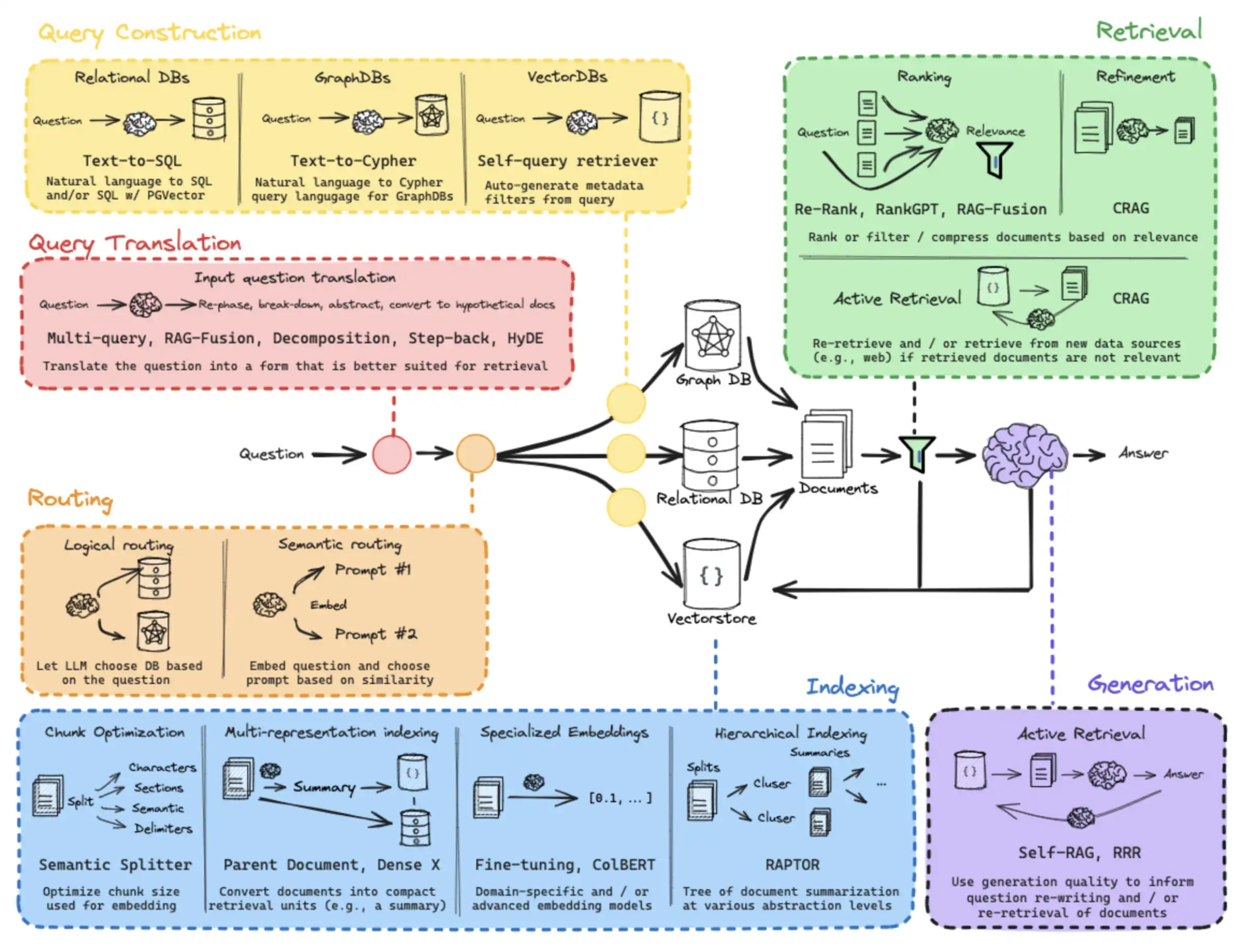
This diagram might be a little intimidating. So, let's simplify it a little bit into some broad topics.
- Imagine the use case
- Gather the Corpus
- Index
- Retrieve
- Generate
For this particular example, we will prioritize a couple of things in the proof-of-concept, minimum viable product:
- Easy to implement
- Accurate, high-quality answers
For now, we will sacrifice:
- Cost
- Performance
- Robust scalability and devops
Relatively expensive, a bit slow, and slapped together with duct tape but does give great answers :)
Imagining the use case
Imagining what you want to accomplish is an under-rated step in the process. Tiny changes to a pipeline can make a big difference in the results you get. A pipeline that is made to teach course materials might not be a good pipeline for a code repo, might not be a good pipeline for HR documents, etc. Subtle changes can make a big difference. So, before we start to get into the more technical parts of RAG, let's envision what we want our chain to do by working backwards from the final prompt.
from langchain.prompts import ChatPromptTemplate template = """You are an expert software developer who knows everything aboutthe Zebra project from the Zcash Foundation. You teach developersabout the project in detail. You are always technically accurate and precisefor a technical audience. You don't make things up or market or hype.Use the previous chat history and the context to respond to the prompt.History:{history}Context:{context}Prompt:{user_prompt}"""prompt_template = ChatPromptTemplate.from_template(template)Gathering the Corpus
Here our concrete case is relatively simple: Let's look at all (?) of the files for this one multi-package git repo. Well, data are never quite that simple! Maybe not every file. If we run tree in the zebra repo, we see we have a good number of data files, .snap snapshot files ... test vectors ... after examining our corpus a little bit, we come to something that looks like this:
from langchain_community.document_loaders.generic import GenericLoaderfrom langchain_community.document_loaders.parsers import LanguageParser loader = GenericLoader.from_filesystem( # since we are using the free2z/zuu metarepo, # we have the zebra repo at a defined location "../../z/ZcashFoundation/zebra/", glob="**/*", suffixes=[".rs", ".toml", ".yaml", ".md", ".json", ".proto"], parser=LanguageParser(),)docs = loader.load()Note that there is nothing quite like plaintext on disk for an easy format to work with!
Indexing and vectorization of the corpus
Indexing, vectorization, and vector storage are fascinating topics of their own.
Check out the LangChain docs on vector storage!
There are a ton of options for vector storage from the langchain community as well. Review some of the options here.
For indexing, we're going to start with the most basic, handy thing and then iterate from there. Indexing the entire repo (the rust code, the markdown and the other files we have chosen as relevant, [".rs", ".toml", ".yaml", ".md", ".json", ".proto"]) only takes about 30 seconds in this setup with Chroma. But, we've made a little hack to persist the index on disk so we can get our retriever back instantly if the index hasn't changed.
Read more about indexing in the langchain docs.
For embeddings, there are many choices. Read more about the langchain interface for embeddings here.
One great thing about langchain is that you can switch out the different pieces of the pipeline and do A/B testing and measure quality, performance, cost. As said earlier, we are prioritizing ease and quality and can iterate on other aspects like performance and cost later. We'll allow our chain to be a bit slow and expensive in this first iteration as long as it yields great quality and it's not too hard to implement and reason about. In the below code, for convenience, we combine loading, splitting, vectorization, and persistence. We will probably refactor this into smaller pieces for production use. But, this gives us a retriever to test with.
from langchain_community.document_loaders.generic import GenericLoaderfrom langchain_community.document_loaders.parsers import LanguageParserfrom langchain.text_splitter import RecursiveCharacterTextSplitterfrom langchain_community.vectorstores import Chromafrom langchain_openai import OpenAIEmbeddings def get_retriever(persist_directory="./chroma/openai", k=20): # Attempt to initialize Chroma from the persist directory # If this directory exists and has data, this will load the data vectorstore = Chroma( persist_directory=persist_directory, embedding_function=OpenAIEmbeddings()) if not vectorstore._collection.count():: # If the directory doesn't exist or is empty, we'll create and save the data print(f"Creating a new Chroma store.") # Load your documents using the GenericLoader loader = GenericLoader.from_filesystem( "../../z/ZcashFoundation/zebra/", glob="**/*", suffixes=[".rs", ".toml", ".yaml", ".md", ".json", ".proto"], parser=LanguageParser(), ) docs = loader.load() # Split your documents into smaller chunks # text_splitter = RecursiveCharacterTextSplitter(chunk_size=1000, chunk_overlap=200) # default is 4000 with 200 overlap text_splitter = RecursiveCharacterTextSplitter() splits = text_splitter.split_documents(docs) # Create the vector store and save it to the specified directory vectorstore = Chroma.from_documents( documents=splits, embedding=OpenAIEmbeddings(), persist_directory=persist_directory) vectorstore.persist() print("Indexed documents and saved Chroma store to disk.") # print(vectorstore.embeddings) # Return the vectorstore as a retriever return vectorstore.as_retriever( search_kwargs={'k': k} )Here we have sort of the minimum example to turn the corpus into a "retriever" - altogether loading, splitting, indexing/vectorizing and getting back a langchain retriever. This is a bit of a simplification. There are a lot of possible optimizations here.
A retriever is an interface that returns documents given an unstructured query. It is more general than a vector store. A retriever does not need to be able to store documents, only to return (or retrieve) them. Vector stores can be used as the backbone of a retriever, but there are other types of retrievers as well.
Check out the langchain docs on retrievers and also the wealth of possible integrations.
One particularly interesting choice would be CoLBERT with RAGatouille. We may try that in a subsequent iteration. Other interesting strategies that we should test for this concrete use case include:
Retrieval
We could experiment with what is mentioned above. But, for this round, let's see what we can get out of our basic retriever with OpenAIEmbeddings and Chroma.
def get_ai(retriever): memory_loader_runnable = MemoryLoaderRunnable(memory) ai = ( { "history": memory_loader_runnable, "context": RunnablePassthrough() | retriever | format_full_docs, "user_prompt": RunnablePassthrough(), } | prompt_template | llm4 | StrOutputParser() ) def chat(user_prompt): words = [] for s in ai.stream(user_prompt): print(s, end="", flush=True) words.append(s) memory.save_context({"input": user_prompt}, {"output": "".join(words)}) return chatThis function again combines a few things for simplicity that might be better split out into module later. It manages history, it does the generation and the streaming. But, let's dive specifically into the context and how this retriever is used:
"context": RunnablePassthrough() | retriever | format_full_docs,This takes the argument with RunnablePassthrough() sends it to the retriever, gets some documents and then sends these to format_full_docs to finalize the context variable in our original prompt template.
format_full_docs is a little hack I made that is sort of like a "Parent document retriever". Since we have the documents locally and they are not too massive, we can opt to include the full file in the context, if the full file is small enough:
def format_full_docs(docs): """ Join the full documents into a single string. We could do a fancier indexing here (hierarchical?), but for now we'll just join the full contents. """ # Collect unique source file paths sources = set() # Prepare to collect content from each file full_contents = [] for doc in docs: if doc.metadata['source'] in sources: continue source = doc.metadata['source'] full_contents.append(f"Source: {source}") # Check if the file is not too large to process # This threshold is arbitrary and can be adjusted based on your needs # Limit to files under 20KB if os.path.getsize(source) < 20 * 1024: try: with open(source, 'r', encoding='utf-8') as file: # Read the entire file content content = file.read() # Append the content to the list, possibly with additional formatting full_contents.append(content) sources.add(source) except Exception as e: print(f"Error reading {source}: {e}") # Otherwise, just append the split content else: full_contents.append(doc.page_content) # Join all contents into a single string, separated by double newlines return "\n\n".join(full_contents)In a production setting, we might want to link our splits to a document in a more generalizable way. Here, we know that we have the files on disk. So, if the files are small enough, we just read the file from disk and include the entire file in our context. If the file is too large, we just include the split that the retriever matched. We definitely want to refactor this to be more idiomatic and modular. BUT, in our concrete case, including entire files makes a huge improvement in our context results.
Another problem here is that "context": RunnablePassthrough() | retriever | format_full_docs, doesn't take the history or anything else into the retriever for matching to our corpus. So, in this current version, if the latest prompt is just "tell me more" then that is all that will go to the vector store for matching. RunnablePassthrough just passes the argument to the next step. There are certainly more interesting and advanced things we could do between the input and the retriever. But, this simple passthrough, along with the format_full_docs hack and putting the history into the context, comes out with pretty good results for a first pass as we will soon see.
Generation
For the final generation step, we are just using GPT4 from OpenAI for the LLM:
llm4 = ChatOpenAI( model_name="gpt-4-turbo-preview", temperature=0, streaming=True,)One of the greatest things about LangChain is that we can switch out the different pieces. The star of the show is the final LLM. There are a lot of choices other than the OpenAI API. Check them out here. Please make a branch of our proof-of-concept and try out other options! It's almost a shame that I publish this post just using the OpenAI API "defaults". But, GPT4 has become a sort of benchmark for the industry. It's a great LLM for comparison. In a subsequent post, we should make a chain that can run locally "for free" with our own hardware. How cool would that be?!
A couple of aspects to note here are history and streaming. I couldn't make a chatbot without history and streaming. Let's look at history.
Chat History
One neat hack we made was to "compress" the history with summarization. This way the overall context to the final prompt won't grow as fast. This makes our overall pipeline a bit cheaper and faster over time and we are less likely to overrun the 128k context window that we have with GPT4.
memory = ConversationBufferMemory() summarize_template = """Summarize the following conversation history while maintainingall of the important vocabulary:{context}"""summarize_prompt = ChatPromptTemplate.from_template(summarize_template) class MemoryLoaderRunnable: def __init__(self, memory): self.memory = memory def __call__(self, input): history = self.memory.load_memory_variables({}).get("history", "") if not history: return "" summary = {"context": RunnablePassthrough()} | summarize_prompt | llm35 | StrOutputParser() return summary.invoke(history) memory_loader_runnable = MemoryLoaderRunnable(memory)A nice hack that we should add (but, I really want to get this post out now 🙂) is piping the history summary into the retriever. Right now we only pass the last input into the retriever. If we maintain the vocabulary for the history and pipe that into the retriever, we would have a much richer query for retrieval as the history grows. As the conversation goes on, the user's prompts might get more simple eg, "tell me more" - the user might start assuming the history. So, in the current implementation, the retriever will not have the same context that the user and the LLM have. FIXME.
Streaming
There is something about streaming that is satisfying. I don't think ChatGPT would have gone viral if it took 10 seconds to get a static response back. We have to have streaming ;9. Langchain makes this easy with OpenAI. Check other providers for compatibility.
def chat(user_prompt): words = [] for s in ai.stream(user_prompt): print(s, end="", flush=True) words.append(s) memory.save_context({"input": user_prompt}, {"output": "".join(words)})Conclusion
This is just a hacky starting point! I'm already itching to change it for the better. But, I don't want to edit this zPage for the rest of time! This little RAG chain is pretty fun and powerful already. But, beware, using fat RAG context with GPT4 is expensive. The response cost $0.0938 in the video above!! We can make it a lot better and cheaper. Let's make one that runs locally with open source models! Find the latest in the free2z/zuu repo.
Happy hacking!