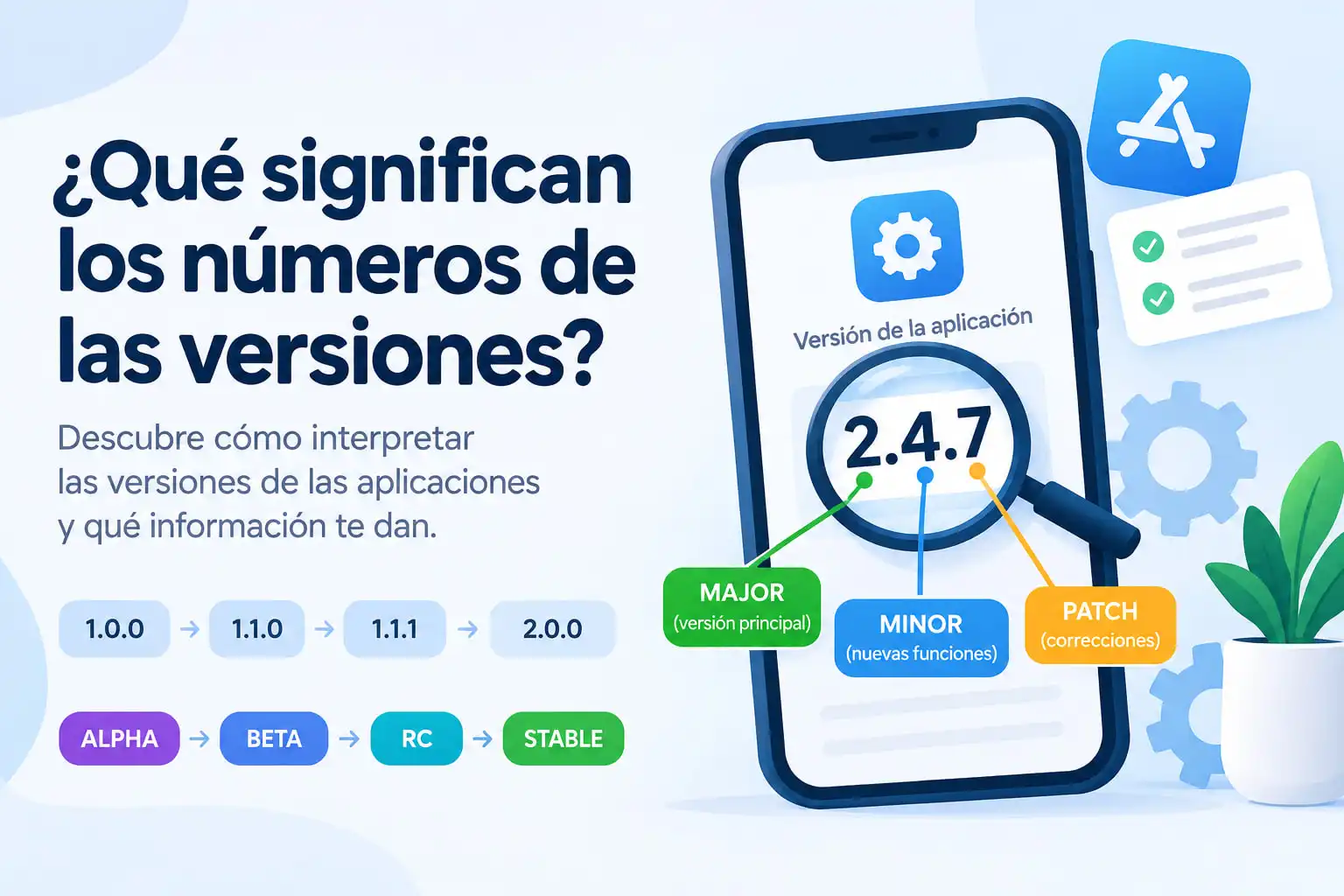

Have you ever seen an application with a version such as 1.0.0, 2.4.7, or 10.2.1 and wondered what all those numbers actually mean? Understanding what do version numbers mean can help you know whether an update introduces new features, fixes bugs, or contains major changes.
Version numbers are used by developers to identify different releases of an application, operating system, game, library, or other software. Although there are different versioning systems, many applications follow a structure that makes the numbers relatively easy to understand.
In this guide, you will learn what do version numbers mean, how to read numbers such as 1.2.3, what MAJOR, MINOR, and PATCH mean, and why some applications use four or more numbers.
What Is a Software Version?
A software version is an identifier assigned to a specific release of an application or program.
For example, an application might have these versions:
1.0.01.1.01.2.01.2.12.0.0Each version represents a particular state of the software.
When developers release an update, they usually change the version number to distinguish the new release from previous versions.
The number can indicate:
- Major changes
- New features
- Bug fixes
- Security updates
- Compatibility changes
- Development or testing stages
- Internal builds
However, not every company uses version numbers in exactly the same way.
What Do Version Numbers Mean?
The most common versioning format is:
MAJOR.MINOR.PATCHFor example:
2.4.7The three numbers can generally be interpreted as:
| Number | Name | Common meaning |
|---|---|---|
| 2 | MAJOR | Major changes or potentially breaking changes |
| 4 | MINOR | New features or improvements |
| 7 | PATCH | Bug fixes and small corrections |
This system is commonly associated with Semantic Versioning, also known as SemVer.
The official Semantic Versioning specification is available at semver.org.
It is important to remember that this interpretation is a convention. Developers can use their own versioning system.
Understanding MAJOR, MINOR, and PATCH
To understand what do version numbers mean, it helps to look at each part individually.
1. MAJOR Version
The first number represents the MAJOR version.
Example:
1.5.3The MAJOR number is:
1When it changes significantly, you might see:
1.5.3 → 2.0.0A major version change can indicate significant changes to the software, including changes that may affect compatibility.
For example:
1.9.9could eventually become:
2.0.0A major update may include:
- A redesigned interface
- Major architectural changes
- New technologies
- Changes to existing features
- Removal of old functionality
- Compatibility changes
- Major performance improvements
However, a major version number does not automatically mean that every aspect of the application has changed.
2. MINOR Version
The second number is commonly called the MINOR version.
For example:
2.4.7The MINOR number is:
4A minor update usually introduces new functionality without representing a major breaking change.
For example:
2.3.0 → 2.4.0The developer might have added:
- A new feature
- A new setting
- Additional customization options
- Support for a new format
- Performance improvements
- Improvements to an existing feature
Minor releases can vary significantly in size depending on the software project.
3. PATCH Version
The third number is commonly called the PATCH version.
For example:
2.4.7The PATCH number is:
7Patch releases usually contain smaller corrections.
For example:
2.4.6 → 2.4.7A patch may include:
- Bug fixes
- Security fixes
- Stability improvements
- Small performance improvements
- Compatibility fixes
Patch releases are often less noticeable to the user than major or minor updates.
A Simple Example of Version Numbers
Imagine that you have an application with version:
3.2.5You could interpret the structure as:
3 = MAJOR2 = MINOR5 = PATCHIf the developers add a new feature, the version could become:
3.3.0If they fix a bug afterward, it could become:
3.3.1If they make a major change that affects compatibility, the version could become:
4.0.0The complete progression might look like:
3.2.5 ↓3.3.0 New features ↓3.3.1 Bug fixes ↓3.3.2 More bug fixes ↓4.0.0 Major releaseThis is one of the easiest ways to understand what do version numbers mean.
What Does Version 1.0.0 Mean?
You may have noticed that many applications eventually reach a version such as:
1.0.0This often represents an important milestone.
In many projects, version 1.0.0 indicates that the developers consider the software ready for a stable or official release.
However, this is not a universal rule.
Some applications remain below version 1.0 for years, while others start directly at versions such as:
10.0100.02026.1The meaning depends on the developer's versioning strategy.
What Does Version 1.0 Mean?
Some applications use only two numbers:
1.02.03.0In this system, there may be no separate PATCH number.
For example:
1.0 → 1.1 → 1.2 → 2.0The first number generally represents a major release, while the second number may represent updates or new features.
Because there is no universal requirement for every application to use three numbers, you should always check the project's documentation when the exact meaning matters.
Why Do Some Applications Have Four Numbers?
You may encounter versions such as:
1.2.3.4or:
10.5.2.1847This usually means the developer is using a versioning system with more than three components.
The fourth number could represent:
- Build number
- Revision number
- Internal release
- Compilation number
- Platform-specific build
- Development iteration
For example:
2.5.1.1048could mean:
2 = Major5 = Minor1 = Patch1048 = BuildBut this interpretation is not universal.
The fourth number may have a completely different meaning depending on the software project.
What Is a Build Number?
A build number is often used to identify a specific compiled version of software.
For example:
Version 5.2Build 1847or:
5.2.1 (1847)Two versions can have the same public version number while having different build numbers.
For example:
5.2.1 Build 18475.2.1 Build 1852Developers can use build numbers internally to track exactly which compilation was distributed.
This is especially useful for:
- Mobile applications
- Operating systems
- Beta testing
- Enterprise software
- Game development
- Internal development
What Do Alpha, Beta, RC, and Stable Mean?
Version numbers can also include labels that describe the development stage.
Common labels include:
AlphaBetaRCStableAlpha
An Alpha release is generally an early development version.
It may contain:
- Experimental features
- Bugs
- Incomplete functionality
- Frequent changes
Alpha releases are usually intended for developers or early testers.
Beta
A Beta release is generally more complete than an Alpha release.
For example:
2.0 BetaA beta version may be available to a larger group of users for testing.
Developers use beta releases to identify:
- Bugs
- Compatibility problems
- Performance issues
- User interface problems
RC — Release Candidate
RC means Release Candidate.
For example:
2.0.0-rc.1A Release Candidate is generally considered close to the final version.
If no major problems are discovered, the RC may become the stable release.
Stable
A Stable release is the version intended for normal use.
For example:
2.0.0Unlike Alpha, Beta, or RC releases, a stable version is generally considered ready for regular users.
Version Development Example
A software project might progress like this:
2.0.0-alpha ↓2.0.0-beta ↓2.0.0-rc.1 ↓2.0.0This gives users an idea of where the software is in its development cycle.
Does a Higher Version Number Mean Better Software?
Not necessarily.
For example:
5.0.0is not automatically better than:
4.9.8A newer version may introduce:
- New features
- Security improvements
- Performance improvements
- Compatibility changes
- New bugs
- Removal of old features
Version numbers primarily identify releases. They are not universal quality ratings.
If you want to know what changed between two versions, the most useful information is usually the changelog or official release notes.
What Is a Changelog?
A changelog is a document that describes changes between software releases.
For example:
Version 2.4.0 Added:- Dark mode- New notification settings Improved:- Application startup speed Fixed:- Login issue- Notification bugThe changelog can tell you much more about an update than the version number alone.
When deciding whether an update is relevant to you, checking the official release notes is often useful.
How to Read an Application Version
Suppose you see:
7.3.2A common interpretation is:
7 = Major version3 = Minor version2 = Patch versionNow imagine you see:
7.4.0The MINOR number increased:
7.3.2 → 7.4.0This commonly indicates a new feature or group of improvements.
If you see:
7.4.1the PATCH number increased:
7.4.0 → 7.4.1This commonly indicates a bug fix or small correction.
And if you see:
8.0.0the MAJOR number increased:
7.4.1 → 8.0.0This commonly represents a major release.
What Does 2.9.9 Mean?
Consider:
2.9.9If the software follows Semantic Versioning, this means:
MAJOR = 2MINOR = 9PATCH = 9The next release does not necessarily have to be:
3.0.0Developers could release:
2.10.0if they add new backward-compatible functionality.
This is an important detail because version numbers are not decimal numbers.
Version 2.10 Is Not Lower Than 2.9
This is a common misunderstanding.
Consider:
2.92.10Some people mistakenly think:
2.10 < 2.9because they read the numbers as decimals.
That is incorrect when comparing structured version numbers.
Instead:
2.10usually means:
Major = 2Minor = 10while:
2.9means:
Major = 2Minor = 9Therefore, the version components should be compared individually rather than treating the entire version as a decimal number.
Not Every Application Uses the Same Versioning System
One of the most important things to understand about what do version numbers mean is that there is no single versioning system used by every application.
Different developers and companies use different approaches.
Some use:
MAJOR.MINOR.PATCHOthers use:
MAJOR.MINOROthers use:
MAJOR.MINOR.PATCH.BUILDAnd some use dates.
Date-Based Versioning
Some software projects use Calendar Versioning, also known as CalVer.
Instead of:
3.4.2you might see:
2026.09or:
2026.09.1The numbers can represent the release year, month, and revision.
For example:
2026.09could represent:
2026 = Year09 = MonthThe exact structure depends on the project's chosen CalVer format.
You can learn more about Calendar Versioning at calver.org.
Why Do Developers Use Version Numbers?
Version numbers are useful for several reasons.
1. Identifying releases
Developers can easily distinguish one release from another.
2. Tracking changes
Version numbers make it easier to determine which release introduced a particular change.
3. Troubleshooting
Technical support teams can ask:
Which version are you using?
This helps them determine whether a known bug affects the user's software.
4. Compatibility
Some applications require specific versions of operating systems, libraries, or other software.
For example:
Requires application version 4.2 or newer5. Security
Security advisories often identify affected versions.
For example:
Versions 3.1.x through 3.4.xThis allows users and administrators to determine whether their software needs to be updated.
Why Version Numbers Matter for Mobile Apps
Mobile applications frequently display version information in the application settings or app store.
You might see:
Version 8.4.2while the developer internally tracks something like:
Version: 8.4.2Build: 10842The public version helps users understand which release they have installed, while the build number can help developers and support teams identify a specific build.
Why Version Numbers Matter for Games
Games also use version numbers to identify updates.
For example:
1.20.4A game update might include:
- New content
- New maps
- Bug fixes
- Balance changes
- Performance improvements
- Security fixes
Some games use completely different systems, such as:
Season 12Update 4.1Patch 6Build 284731Therefore, the meaning depends on the developer's chosen system.
Why Version Numbers Matter for Operating Systems
Operating systems often use their own versioning schemes.
For example, an operating system may identify releases using:
24.04or:
15.2.1These numbers can represent major releases, minor releases, maintenance releases, years, or other information depending on the operating system.
This is another reason why you should not automatically assume that every software project follows Semantic Versioning.
Should You Always Install the Latest Version?
Not necessarily.
Before updating an application, consider:
- What does the update change?
- Does it fix a security problem?
- Does it add a feature you need?
- Does it fix a problem you are experiencing?
- Is your operating system compatible?
- Does the new version remove functionality you use?
- Are you running plugins or extensions that may not be compatible?
For security-related updates, checking the official security advisory and release notes can be particularly important.
How to Quickly Understand a Version Number
When you see a version such as:
4.7.2you can start with this interpretation:
4 → Major7 → Minor2 → PatchThen check the developer's documentation to confirm how that project uses version numbers.
A useful rule is:
The structure tells you how the developer organizes releases, while the changelog tells you what actually changed.
Common Version Number Examples
Here are some common formats:
| Version | Possible interpretation |
|---|---|
1.0.0 |
First stable major release |
1.2.0 |
New minor features |
1.2.1 |
Patch or bug fix |
2.0.0 |
Major release |
2.5 |
Two-part versioning |
3.4.2.1250 |
Version plus build/revision |
2.0-beta |
Beta release |
2.0-rc.1 |
First Release Candidate |
2026.09 |
Possible date-based version |
2026.09.1 |
Date-based release plus revision |
These interpretations are examples rather than universal rules.
What Do Version Numbers Mean in Simple Terms?
If you want the shortest explanation of what do version numbers mean, think of a version like an identification system.
For a typical Semantic Versioning release:
2.4.7│ │ ││ │ └── PATCH: bug fixes│ └──── MINOR: new features└────── MAJOR: major changesSo:
2.4.7does not mean "two point four seven" like a normal decimal number.
It is a structured identifier composed of separate version components.
Frequently Asked Questions
What do version numbers mean?
Version numbers identify different releases of software. In a common MAJOR.MINOR.PATCH system, the first number represents major changes, the second represents new functionality, and the third represents patches or bug fixes.
What does 1.0.0 mean?
In many projects, 1.0.0 represents the first stable major release. However, the exact meaning depends on the project's versioning rules.
What does 2.0.0 mean?
2.0.0 generally indicates a new major version. In Semantic Versioning, a major version increase can indicate changes that are not backward compatible.
What does the third number mean?
In a typical MAJOR.MINOR.PATCH system, the third number represents the PATCH version and is commonly used for bug fixes and small corrections.
What does a fourth number mean?
A fourth number often represents a build, revision, or internal release number, but its exact meaning depends on the software developer.
Is a higher version always better?
No. A higher version identifies a newer release, but the version number itself does not indicate quality. Check the changelog and release notes to understand what changed.
What is Semantic Versioning?
Semantic Versioning is a convention for assigning version numbers using a structure such as:
MAJOR.MINOR.PATCHThe official specification is available at semver.org.
What is CalVer?
CalVer, or Calendar Versioning, is a versioning approach that uses calendar dates as part of the version number. The exact format depends on the project.
Final Thoughts
Understanding what do version numbers mean makes it easier to identify software releases and understand the general type of update you are installing.
When an application uses the common:
MAJOR.MINOR.PATCHformat, you can usually interpret it as:
MAJOR → significant changesMINOR → new features and improvementsPATCH → bug fixes and small correctionsHowever, version numbers are not universal. Some developers use four-part versions, build numbers, dates, release labels, or completely custom systems.
The best way to understand a specific update is to combine the version number with the official changelog or release notes.
Once you know how versioning works, numbers such as 1.0.0, 2.4.7, 3.10.2, or 2026.09 become much easier to understand.