ZecWallet Lite: Keeping it alive.
ZecWallet Lite is a product of the excelent job of adityapk00. Unfortunately for us, after four years of work on ZecWallet, Aditya announced he would setp back from working on Zecwallet.
ZecWallet Lite was the first wallet of many Zcash users, including myself.
ZecWallet Lite is getting outdated, specially it's transactions, which utilizes the old fee of 1000 zatoshis, i.e. 0.00001 ZEC. Due to introduction of zip317 and Zcash's mempool overload, using ZecWallet Lite nowadays is pretty much infeasible.
In this article I'll explain how you can compile ZecWallet Lite from the source code with a custom fee, this way, keeping this awesome wallet alive!
Getting started
First, let's understante a little about ZecWallet Lite structure.
There is trhee main components that composes ZecWallet:
- ZecWallet Lite
- This is the frontend, the wallet application as we know it. It makes easy for us to see our balance, send transactions, etc... The frontend is written in TypeScript and Electron.
- ZecWallet Light CLI
- This is the backend, can be used either as a standalone command line application, or compiled as a library to be used in Rust. The backend library depends on Zcash's
librustzcash.
- This is the backend, can be used either as a standalone command line application, or compiled as a library to be used in Rust. The backend library depends on Zcash's
- Neon binding
- In order for the wallet frontend communicate with the library, we need a native node.js module. The native module is a node.js compiled module of the backend library.
Setting everything for compiling
For compiling our ZecWallet Lite with a custom fee, we'll need to clone some githuib repositories and change a few files.
I recommend creating a directory somewhere in your system:
$ mkdir zecwallet-customfee$ cd zecwallet-customfeeFirst repository we need to clone is librustzcash. But ZecWallet uses a custom fork of Zcash's librustzcash. We need to pay attention and clone the exact repository and checkout the right branch.
$ git clone https://github.com/adityapk00/librustzcash.git$ cd cd librustzcash$ git checkout adf49f8b848a5ac85e1476354614eeae9880206aAfter that, you'll receive a message saying that HEAD is now at adf49f8b Orchard builder, copied from str4d and AloeareV.
Open the file librustzcash/zcash_primitives/src/transaction/components/amount.rs in a text editor and change line 10 from:
pub const DEFAULT_FEE: Amount = Amount(1000);To a custom fee amount:
pub const DEFAULT_FEE: Amount = Amount(12345);Note: Amount is expressed in zatoshis, 12345 zatoshis is equivalent to 0.00012345 ZEC.
Privacy warning!
For illustrative purposes, I'm using a custom fee of 12345 zatoshis. But keep in mind this will leave a fingerprint on your transactions, I suggest using standard ammounts like 10000 or 20000 zatoshis.
After that we'll cone ZecWallet Lite CLI:
$ git clone https://github.com/adityapk00/zecwallet-light-cli.gitOpen file zecwallet-light-cli/Cargo.toml in a text editor and comment out lines 11 to 16.
From this:
zcash_address = { git = "https://github.com/adityapk00/librustzcash", rev = "adf49f8b848a5ac85e1476354614eeae9880206a"}zcash_primitives = { git = "https://github.com/adityapk00/librustzcash", rev = "adf49f8b848a5ac85e1476354614eeae9880206a"}zcash_client_backend = { git = "https://github.com/adityapk00/librustzcash", rev = "adf49f8b848a5ac85e1476354614eeae9880206a"}zcash_note_encryption = { git = "https://github.com/adityapk00/librustzcash", rev = "adf49f8b848a5ac85e1476354614eeae9880206a"}zcash_encoding = { git = "https://github.com/adityapk00/librustzcash", rev = "adf49f8b848a5ac85e1476354614eeae9880206a"}zcash_proofs = { git = "https://github.com/adityapk00/librustzcash", rev = "adf49f8b848a5ac85e1476354614eeae9880206a"}to this:
#zcash_address = { git = "https://github.com/adityapk00/librustzcash", rev = "adf49f8b848a5ac85e1476354614eeae9880206a"}#zcash_primitives = { git = "https://github.com/adityapk00/librustzcash", rev = "adf49f8b848a5ac85e1476354614eeae9880206a"}#zcash_client_backend = { git = "https://github.com/adityapk00/librustzcash", rev = "adf49f8b848a5ac85e1476354614eeae9880206a"}#zcash_note_encryption = { git = "https://github.com/adityapk00/librustzcash", rev = "adf49f8b848a5ac85e1476354614eeae9880206a"}#zcash_encoding = { git = "https://github.com/adityapk00/librustzcash", rev = "adf49f8b848a5ac85e1476354614eeae9880206a"}#zcash_proofs = { git = "https://github.com/adityapk00/librustzcash", rev = "adf49f8b848a5ac85e1476354614eeae9880206a"}AND uncomment lines 19 to 24. From this:
#zcash_address = { path = "../librustzcash/components/zcash_address/" }#zcash_primitives = { path = "../librustzcash/zcash_primitives/" }#zcash_client_backend = { path = "../librustzcash/zcash_client_backend" }#zcash_note_encryption = { path = "../librustzcash/components/zcash_note_encryption" }#zcash_encoding = { path = "../librustzcash/components/zcash_encoding/" }#zcash_proofs = { path = "../librustzcash/zcash_proofs/" }To this:
zcash_address = { path = "../librustzcash/components/zcash_address/" }zcash_primitives = { path = "../librustzcash/zcash_primitives/" }zcash_client_backend = { path = "../librustzcash/zcash_client_backend" }zcash_note_encryption = { path = "../librustzcash/components/zcash_note_encryption" }zcash_encoding = { path = "../librustzcash/components/zcash_encoding/" }zcash_proofs = { path = "../librustzcash/zcash_proofs/" }After that, We'll clone the ZecWallet Lite application.
$ git clone https://github.com/adityapk00/zecwallet-lite.gitAnd then edit the file zecwallet-lite/native/Cargo.toml. Commenting line 18 and uncommenting line 19. The file will look like this:
#zecwalletlitelib = { git = "https://github.com/adityapk00/zecwallet-light-cli", rev = "fd5d11f0f28e0f1628ea8fdad0cce16d50e6bb98" }zecwalletlitelib = { path = "../../zecwallet-light-cli/lib" }Also, in the same file comment lines 24 to 29.
At the end of this file, add the following lines:
zcash_address = { path = "../../librustzcash/components/zcash_address/" }zcash_primitives = { path = "../../librustzcash/zcash_primitives/" }zcash_client_backend = { path = "../../librustzcash/zcash_client_backend" }zcash_note_encryption = { path = "../../librustzcash/components/zcash_note_encryption" }zcash_encoding = { path = "../../librustzcash/components/zcash_encoding/" }zcash_proofs = { path = "../../librustzcash/zcash_proofs/" }Good! We're now ready to compile our ZecWallet with the fee we configured in the first step.
Make sure your parent directory looks like this:
.├── librustzcash├── zecwallet-light-cli└── zecwallet-liteCompiling ZecWallet Lite
For compiling ZecWallet Lite and it's dependencies, you'll need rust, yarn, pkg-config, libssl-dev, cmake and probably a few other things. Make sure to install everything before compiling.
Compile ZecWallet Lite:
$ cd zecwallet-lite$ yarn install$ yarn buildNote: If for some reason you get ERR_OSSL_EVP_UNSUPPORTED error while running yarn build, try exporting NODE_OPTIONS=--openssl-legacy-provider env variable, or downgrade to node version 16.16.0.
Now you have everything compiled. ZecWallet is written with Electron, it supports exporting executables for Linux, Windows and Mac. To generate these executables run one of the following:
$ yarn dist:linuxor$ yarn dist:winor$ yarn dist:macThe executables will be stored under zecwallet-lite/dist.
Running ZecWallet Lite and sending a transaction
Since I'm running linux, I have the choice to install the .deb package or run the AppImage file.
Running the AppImage executable:
$ cd dist$ ./Zecwallet Lite-1.8.8.AppImageNow we have the ZecWallet Lite we all love running, let's send a transaction and test our custom fee. Check it using a block explorer: ffaf36bdd32354827f1f341e60332c62282cccbbe5ef65e6b1e6f81c00e249d3.
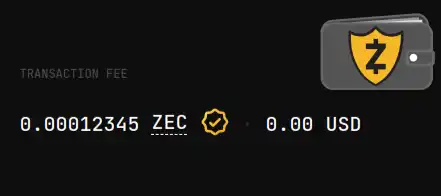
Yes! It's working. We can see the transaction fee of 0.00012345 ZEC.
Closing Words and disclaimer
This article was written to help anyone who wants to compile ZecWallet Lite with a custom fee. Even though the process is straightforward, do it at your own risk! I don't take any responsibility for loss of funds or any problem that might arise from you following this article.